Screen Resolution Manager
Latest version: 5.2
Do you have to change computer resolution back to what you like at every time your kids play games? Or you have a pesky co-worker who keeps altering screen resolution? There are two ways you can solve the problem. First — yell at other people. Second — get Screen Resolution Manager.
No Inconveniences, No Compromises
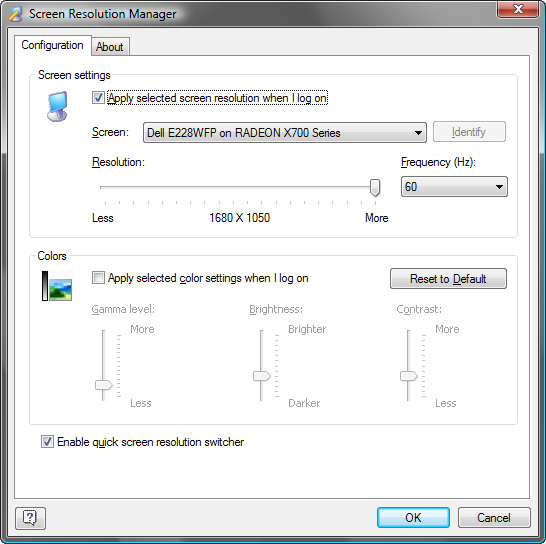
Screen Resolution Manager is simple, yet much needed computer utility that allows each user to set preferred screen resolution. Each time a user logs in, screen resolution, color gamma, brightness and contrast preferences automatically get set to the user-determined values. It means the people with bad eye-sight won't have to deal with high resolution when the icons are so small on the monitor they can't be easily seen. Instead, the resolution will be set lower and people with bad eye-sight will see large icons on their Screen. The program is also perfect for families, since the majority of games run in 640x480 and while most people love to keep their desktop at 1600x1200. If you cannot agree with your co-workers about screen brightness, Screen Resolution Manager will help too! Microsoft says that it's not possible. We say — it is!
Flexibility
One of the important features of Screen Resolution Manager is that it is capable of managing screen resolution for multiple monitors. The program can also be successfully employed by Win XP co-switch users for setting the correct computer screen resolution. Also you don't have to worry about the icon placement on your desktop. The program keeps icons where you put them after changing screen resolution.
Are you web designer and need to see how your design looks in different display resolutions? Screen Resolution Manager offers unique Quick Screen Resolution Switcher feature which will help you to switch your screen modes in a snap. And your desktop icons won't get messed up!
System Requirements
The program works under Windows 2000, XP, 2003 and Vista.
|
Purchase Screen Resolution Manager Now!
It's only US$ 1695 (+ optional US$ 1250 shipping if you want it on CD) |
Designed with Simplicity in Mind
Screen Resolution Manager is extremely easy to administer. Are you inexperienced home computer user? Or you are a system administrator? You don't have to be concerned with configuring this application. Using the software is intuitive and requires no special knowledge.
Screen Resolution Manager in action (click to enlarge the image).
Quick Screen Resolution Switcher in action.
Start Using Screen Resolution Manager Right Now
Want to Try it First?
You can download 14 day free trial version of Screen
Resolution Manager. You will see how Screen Resolution Manager will solve your
problem!